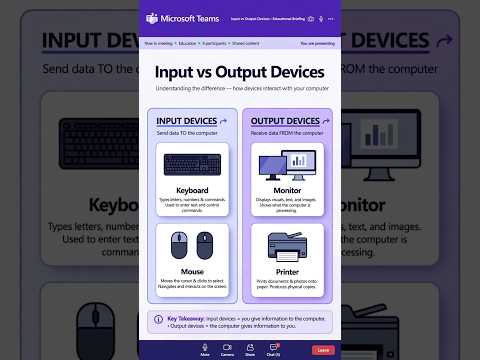
Computers surround us every day, but have you ever wondered how we actually communicate with these powerful machines? At the core of every system lies computer hardware that allows us to send commands and receive results. These physical components are broadly categorized into input and output devices. Whether you are studying for a school science exam or simply building your digital literacy, understanding how these components interact is essential.
What Are Input Devices?
Input devices are the tools we use to enter data, commands, and instructions into a computer. They act as translators between human actions and digital code, converting physical inputs into signals the processor can understand.
Common examples of input devices include: * Keyboard: The most traditional input device used for typing text, numbers, and system commands. * Mouse: A pointing device that allows users to select, move, and interact with elements on a screen. * Microphone: Captures audio signals and converts them into digital sound files. * Scanner: Converts physical documents and photos into digital images.
Without input devices, a computer would sit idle with no data to process or instructions to follow.
What Are Output Devices?
Once the computer's central processing unit (CPU) finishes processing the input data, output devices take over. An output device converts digital information back into a human-readable or perceptual format, such as visuals, text, or sound.
Key examples of output devices include: * Monitor: The primary visual screen that displays images, videos, and user interfaces. * Printer: Converts digital files into physical hard copies on paper. * Speakers & Headphones: Output audio signals so users can listen to music, voice notes, or system alerts. * Projector: Displays computer visuals onto a large surface or wall for presentations.
Why Understanding Computer Hardware Matters for Students
For school students learning computer science, distinguishing between input and output devices is a foundational skill. Today's modern hardware continues to evolve, giving rise to hybrid devices like touchscreens, which function as both input (touching the screen) and output (viewing the display) tools.
By testing your knowledge with basic questions and answers about these devices, you prepare yourself for more advanced topics in technology. Mastering how essential hardware functions will help you better understand the digital world powering our everyday lives.


